BBS MONTHLY BUZZ
A monthly email newsletter from Best Business Strategies
|
|
|
|
In this issue:
●Discover What’s New in Sage 50 2026.1
●Timing Matters: Our Recommendation on Major Software Updates
●July Sage 50 Tip or Trick
●Automate Sales Tax Compliance and Reduce Audit Risk
●Take Control of Your Cash Flow with Our New AP Partner Solution
|
|
|
|
💻To ensure an optimal experience on our website and all attached links, we recommend utilizing either Google Chrome or Microsoft Edge as your web browser.
|
|
|
|
What’s New in Sage 50 2026.1
|
|
|
|
|
|
|
The Sage 50 2026.1 update brings powerful automated workflows, enhanced security, and streamlined payment solutions designed to save time and reduce manual data entry.
This update applies to all Pro, Premium, and Quantum editions of both desktop and hosted Sage 50 Accounting.
|
|
|
|
Here is a breakdown of the top features and key enhancements in this release:
|
|
|
|
AI Document Capture
Say goodbye to manual data entry for incoming vendor documents. The new AI Document Capture feature automatically extracts, classifies, and inputs purchase invoices and credit memos directly into your system—improving accuracy and eliminating tedious paperwork.1
Integrated Invoice Payments (via Fortis)
With Fortis, you can now send secure payment
requests with a “Pay Now” link directly from Sage 50.
Accept your Credit Card and ACH payments with
customizable options that work for you and your
customers including recurring, partial, and MOTO
transactions. Tired of manual reconciliation? Fortis will
automatically update your ledger to save time and allow
you to focus more on your business.2
|
|
|
|
Unified Sage Account Login
Sage has simplified user access across its entire ecosystem. With single sign-on (SSO) authentication, you can now securely log in across Sage applications using a single set of credentials.3
Banking & Payroll Enhancements
Expanded Banking Integrations
Direct browser-based authentication now makes connecting with major financial institutions—including Capital One, BMO, J.P. Morgan Access, and Goldman Sachs—more secure and reliable. Bank feeds sync automatically to keep your registers accurate without manual intervention.
Retirement Super Catch-Up (Payroll):
Stay fully compliant with updated IRS rules. You can now easily configure super catch-up contributions for eligible employees aged 60 through 63. 4
Expanded Special Fields:
Sage has increased the available special payroll calculation fields from 5 to 15, giving you greater flexibility for custom payroll formulas and complex state-specific tax rules.5
Resolved Issues
✅Email Integration: Fixed webmail installation errors to enable sending emails via Microsoft 365 Outlook from Sage 50.
✅Serial Numbers: Auto-populates serial numbers during installation for easier setup.
✅Messaging & Links: Clarified obsolescence messaging by removing outdated article references, and removed dead links for retired Sage One and SBCA integrations.
|
1 AI Document Capture requires an active Sage 50 subscription and is not available in Accountant Edition. Accountants should use AutoEntry, which is purpose-built to automate entry.
2 Invoice Payments requires an active Sage 50 subscription.
3 Sage account login requires an active Sage 50 subscription
4 & 5 You need a service plan that includes payroll.
|
|
|
|
💡When Should I Take Sage 50 Updates?
|
|
|
|
|
|
Timing Is Everything: Our Update Recommendation
While we are always excited about new features and workflow improvements, we recommend waiting a short time before installing major updates after their initial release. Please note that payroll updates are an exception, as having the latest payroll information is essential.
New software releases may contain unexpected bugs or compatibility issues. Allowing time for initial patches and fixes helps ensure a more stable experience and minimizes disruptions to your daily operations.
We recommend waiting a few weeks before installing updates including the Sage 50 2026.1 update to ensure a smooth transition for your system. We are currently issuing a yellow light status. We will notify you via email with a green light as soon as it is safe to proceed—look for ‼️ in the email subject line.
|
|
|
|
🚨Important Installation & Upgrade Notes
- ‼️ALWAYS Back Up First: Always create a complete backup of your company files prior to upgrading.
- Check Compatibility: If you use third-party add-ons or integrations, verify compatibility with your software vendor before running the update.
- Restart Before Updating: Check for Windows updates and reboot your server and workstations before beginning installation to ensure a smooth update process.
‼️If you are in a Sage 50 Cloud Hosting subscription Sage 50 2026.1 will automatically deploy.
Sage 50cloud subscribers receive the 2026.1 update automatically. Company database conversions will take place upon first launch after the update is applied.
|
|
|
|
Are you tired of dealing with software updates and technical maintenance?
Let Sage 50 Cloud Hosting do the work for you. Our cloud-hosted solution keeps your software up to date automatically, protects your data with advanced security measures, and makes it easy to access your system from anywhere. Learn More
|
|
|
|
|
July Sage 50 Tip or Trick-Memorized Transactions
|
|
|
|
If you find yourself constantly repeating a large transaction daily, weekly or monthly, you can create a template. It is called a Memorized Transaction.
A Memorized Transaction can be created from scratch or an existing transaction where you can enter and save common transactions for later use. The types of transactions Sage 50 can memorize and store include customer quotes, sales invoices, purchase invoices, purchase orders, payments, or General Journal entries. For example, you may want to repeat a transaction previously used for a customer several times. Using memorized transactions can save time in repetitive data-entry tasks.
To create a Memorized Transaction from scratch:
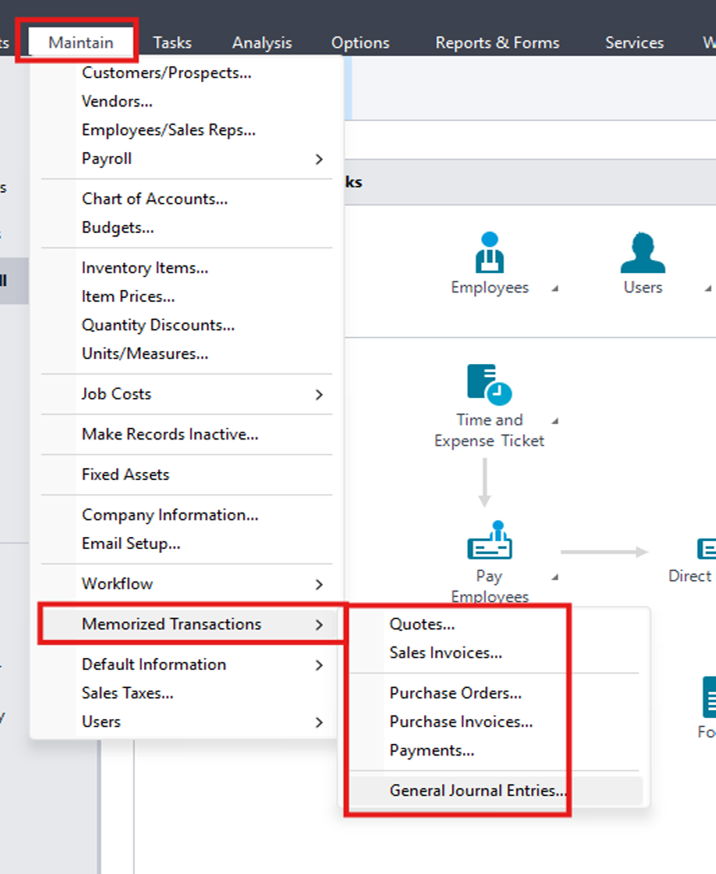
1) To enter a memorized transaction: From the Maintain menu, select Memorized Transactions. Then, select the type of transactions desired.
|
|
|
|
For this example, we are using the General Journal Entry.
|
|
|
|
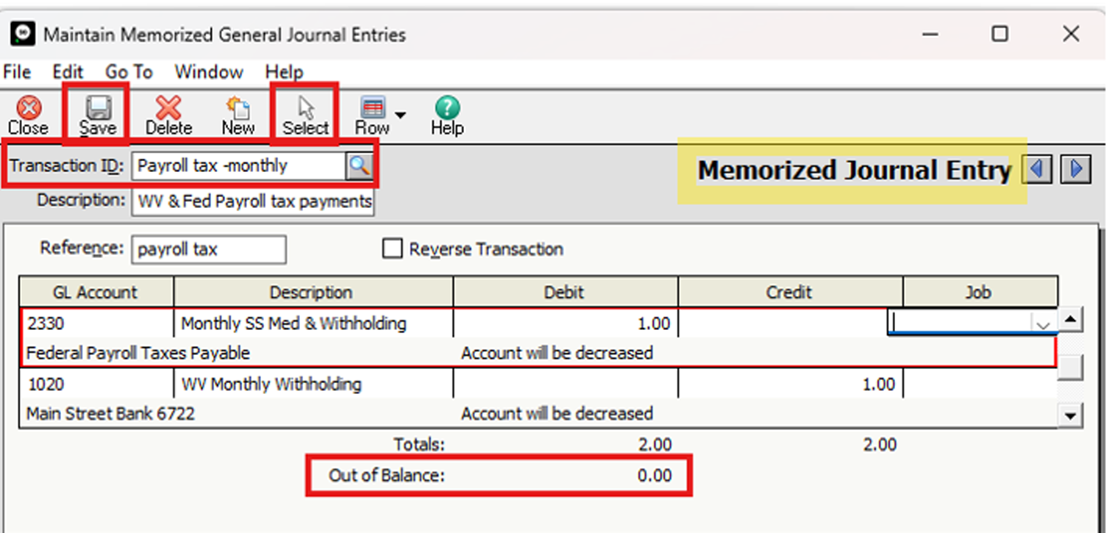
2) Enter a transaction ID and description that defines the transaction. Then, enter the transaction information.
3) When finished, click Save to record the memorized transaction for later use.
Memorized transactions are not posted to journals or the general ledger. They are simply templates.
Note: Not all transaction fields are maintained in memorized transactions. Once you create your TEMPLATE, you may select it at any time. It is not going to be a real transaction until you SELECT it!
Once selected, you may modify the information without destroying the original layout. This is where you enter information in the unique fields such as the invoice number and date as well as your transaction information for the entry you are creating.
our content.
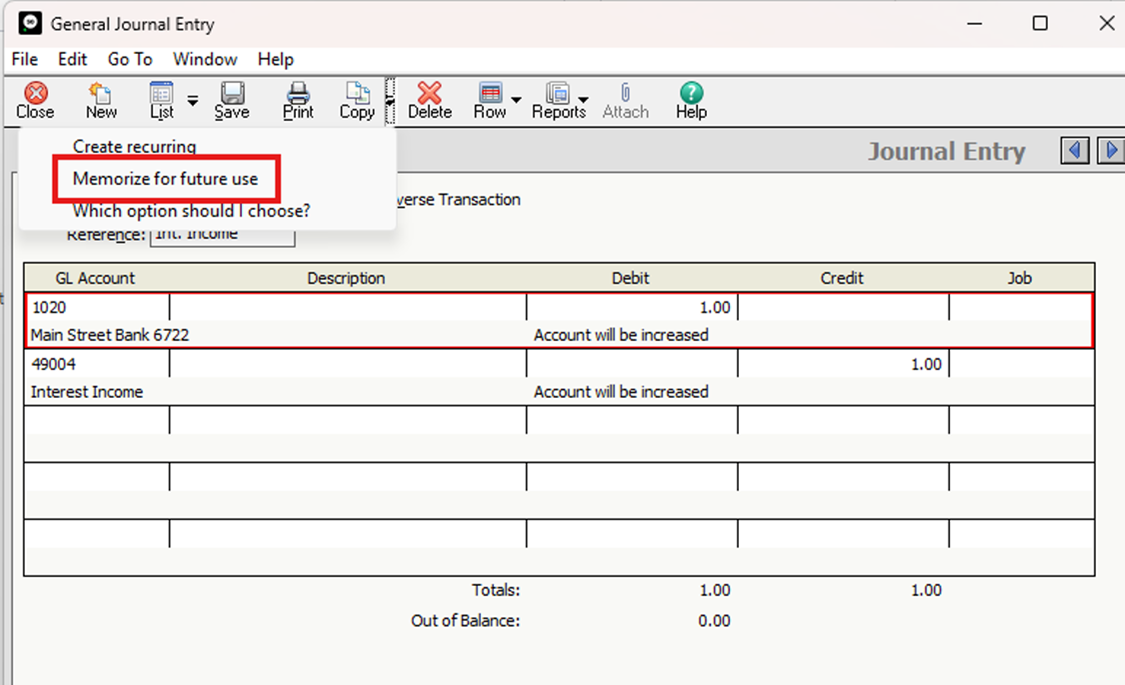
Creating a Memorized Transaction from an Existing Transaction:
If you already have a transaction that you use repeatedly, you don’t have to rebuild it in Memorized Transactions, you can simply create the Memorized Transaction from the existing transaction.
Since this transaction does not say “Memorized Journal Entry, it designates that it is a real General Journal entry and this will post to the General Ledger.
|
|
|
|
I hope this Tip will save you time moving forward.-Shirley Byard, Sage 50 Master Certified Consultant.
Shirley@BestBusinessStrategies.com
|
|
|
|
New Accounts Payable Solution That Integrates with Sage 50
|
|
|
|
|
|
Tired of manual invoice entry, paper checks, and tedious approval chains?
We’re excited to share a major upgrade to our offerings through one of our partners. Their Accounts Payable platform is designed to streamline your entire payment workflow into a simple, one-click process that saves time, prevents fraud, and keeps your capital liquid longer.
|
|
|
|
Here is a full breakdown of how our new solution can transform your AP operations:
💳 Payment Flexibility & Revenue Generation
Multiple Payment Options: Pay your vendors on your terms via standard ACH, paper check, or virtual credit cards.
Earn Exclusive Cash Back: Turn an expense center into a revenue generator by earning cash-back rewards every time you make vendor payments using virtual cards.
Batch Payments: Consolidate multiple bill payments or pay several vendors at once in a single transaction.
🛡️ Enhanced Fraud Protection & Spending Controls
- Virtual Card Security: Keep your primary credit card and bank account details private by issuing unique, temporary virtual card numbers for payments.
- Granular Controls: Set strict spending limits or disable virtual card access instantly to prevent unauthorized charges.
⚡ Automated Workflows & Smart Approvals
One-Click & Automated Payments: Pay bills instantly with one click or schedule recurring fixed payments up to a set limit.
Smart Approval Rules: Keep payments moving without bottlenecks by customizing single- or multi-layer approval workflows based on role, dollar amount, vendor, or specific criteria.
🔄 Seamless Accounting Integration
- Auto-Reconciliation: Connects directly with your Sage 50 accounting software.
- Zero Double Entry: Eliminate manual data entry errors and get real-time status updates that reconcile payments in seconds.
Ready to take control of your cash flow? Schedule a demo to see the platform in action.
Please fill out the form below, and we’ll connect you with our partner, who will reach out to schedule a personalized demo.
|
|
|
|
Streamline Your Sales Tax & Stay Compliant with Sage + Avalara
|
|
|
|
Managing sales tax compliance can quickly become a time-consuming headache—especially as your business grows across new cities, states, or sales channels. Staying up to date with shifting tax rates, rules, and filing deadlines takes focus away from growing your core business.
That’s why we recommend Sage Sales Tax, powered by Avalara.
By integrating Avalara directly into your Sage system, you can automate tax management end-to-end and significantly lower your audit risk.
|
|
|
|
|
Key Benefits for Your Business:
Automate Tax Calculations: Real-time, precise tax calculations based on the latest rates and boundaries across jurisdictions.
Streamline Documentation & Exemptions: Easily collect, store, and manage sales tax exemption certificates in one place.
Automate Filings & Remittances: Prepare and file returns automatically to meet state deadlines and avoid late penalties.
Manage Registrations & Licensing: Get expert guidance and tools to establish licenses and register seamlessly wherever you have nexus.
Determine Tax Obligations: Track where your sales create tax obligations so you never miss a new compliance requirement.
Ready to Simplify Your Tax Compliance?
As an Avalara partner, we’re here to help you explore automated sales tax solutions. Fill out the form below, and we’ll connect you with the Avalara team, who will reach out to schedule a personalized discussion.
|
|
|
|
💡Visit our Blog for archived text-only past issues of our newsletter.
|
|
|
|
Best Business Strategies Communication Schedule
|
|
|
|
We use Act! Marketing Automation for our BBS Buzz Newsletter. If you would like to learn more, please get in touch with Allen Byard at 304-233-2612.
|
|
|
|
|





 5.0
5.0 verified by TrustindexTrustindex verifies that the company has a review score above 4.5, based on reviews collected on Google over the past 12 months, qualifying it to receive the Top Rated Certificate.