




2026 May BBS Monthly Buzz
In this issue:
●Why Sage 50 Inventory Is a Game-Changer for Growing Businesses
●Sage 50 Simplified-Check Out Sage 50 Study Guides
●Sage 50 May Tip or Trick
●Refer a Friend to Sage 50
Sage 50 Inventory: Smart, Scalable, and Built for Success
Did you know Sage consistently earns high marks for its inventory features? Are you using your Sage 50 accounting to its full potential?
Here’s a simple look at what Sage 50 inventory does best and how it helps keep everything in your supply chain running smoothly.
✅Flexible Costing Methods-One size rarely fits all when it comes to inventory valuation. Sage 50 shines by offering support for multiple inventory costing methods, allowing businesses to choose the strategy that best fits their tax structure and industry alignment:
FIFO (First-In, First-Out): Ideal for perishable goods or items with a short shelf life.
LIFO (Last-In, First-Out): Often used in times of inflation to match current higher costs against current revenues.
Average Cost: Best for businesses with high volumes of interchangeable items where tracking individual costs isn’t practical.
Specific Identification (Serialized): Crucial for high-value items, electronics, or medical devices where tracking the exact cost of a specific unit is required.
✅Robust Serial Number and Lot Tracking-For businesses that operate in regulated industries or sell high-ticket items, traceability is non-negotiable. Higher-tier editions of Sage 50 (such as Sage 50 Premium and Quantum) offer Serial Number tracking.
Warranty Management: Serial number tracking ensures that when a item comes back for repair, you are verifying the exact unit sold, protecting your business against warranty fraud.
✅Automated Reorder Points and Quantities-Running out of stock (stockouts) leads to lost sales, while overstocking ties up valuable cash. Sage 50 mitigates this balancing act through automated inventory alerts.
You can set Minimum Stock Levels and Reorder Quantities- for individual items. When stock dips below your defined threshold, Sage 50 automatically flags the item. Even better, it can automatically populate purchase orders for your preferred vendors, streamlining the replenishment cycle from days to minutes.
✅Item Attributes and Master Items (Matrix Inventory)- If you sell products that come in various sizes, colors, or materials (like apparel or manufacturing components), creating separate inventory codes for every single variation is a nightmare.
Sage 50 solves this with Item Attributes. You can create a “Master Item” (e.g., Classic T-Shirt) and establish a matrix of attributes (Sizes: S, M, L; Colors: Red, Blue, Black). The system automatically generates the sub-SKUs, keeping your inventory catalog clean, organized, and easy to navigate.
✅Multi-Level Bills of Materials (BOM)– For light manufacturers, assemblers, and kitting businesses, Sage 50’s Assembly feature is a major asset.
You can define a Bill of Materials (BOM) that outlines exactly which raw materials or sub-assemblies compose a finished product. When you run a “Build” command, Sage 50 automatically deducts the raw components from your inventory and adds the newly minted finished good into stock, recalculating the costs perfectly behind the scenes.
✅Seamless Accounting Integration-Perhaps the greatest strength of Sage 50’s inventory module is that it doesn’t exist in a vacuum. Because Sage 50 is an accounting-first platform, every inventory transaction dynamically updates your general ledger.
When you sell an item, your inventory asset account drops, your Cost of Goods Sold (COGS) updates, and your accounts receivable increases simultaneously. This real-time synchronization eliminates the need for messy end-of-month manual adjustments and ensures your financial statements are always accurate.
Need More Expertise in Setting Up Inventory?

Check out Sage’s Inventory Training Guide
Topics covered include:
Module 1-Overview & Setup
Setting up inventory defaults
Adding inventory items
Entering beginning balances
Module 2-Managing Inventory
Entering inventory adjustments
Inventory services management center
Module 3-Advanced Inventory
Inventory reports overview
Managing assemblies
Creating master stock items
Using serialized inventory
Changing item prices
Understanding inventory cost and valuation
Module 4-Quantum Exclusive Inventory Features
Revising the assembly bill of materials
Tracking assembly builds with work tickets
Using multi-pack units of measure
Deferring quantity discounts
Order process workflow
Configuring my dashboard
Other Training Guides Include:
Designing Forms & Financials
Payroll
Data Management
Core Modules
Time & Billing
Quantum Advantage
Job Costing
Flat-rate shipping on every order—so pair multiple study guides and maximize your savings!
Sage 50 Tip of the Month
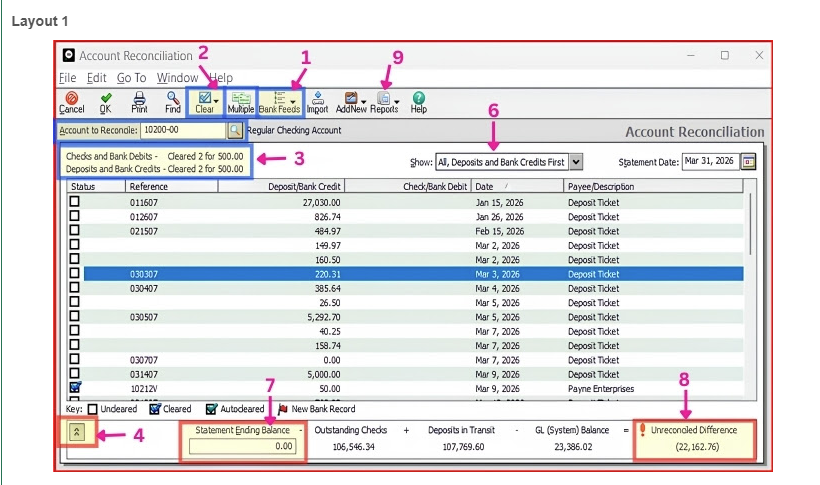
Easiest way to reconcile your bank account in Sage 50 US Version
Always reconcile monthly or weekly  Smaller batches=much faster
When reconciling, to make your job easier use all the tools in your tool box.
- Use “Bank Feeds” and Import Bank Transactions Daily
- Use “Clear” (if applicable to clear consecutive checks)
- Match *Check and Bank Debits & *Deposits and Bank Credits to the Bank Statement
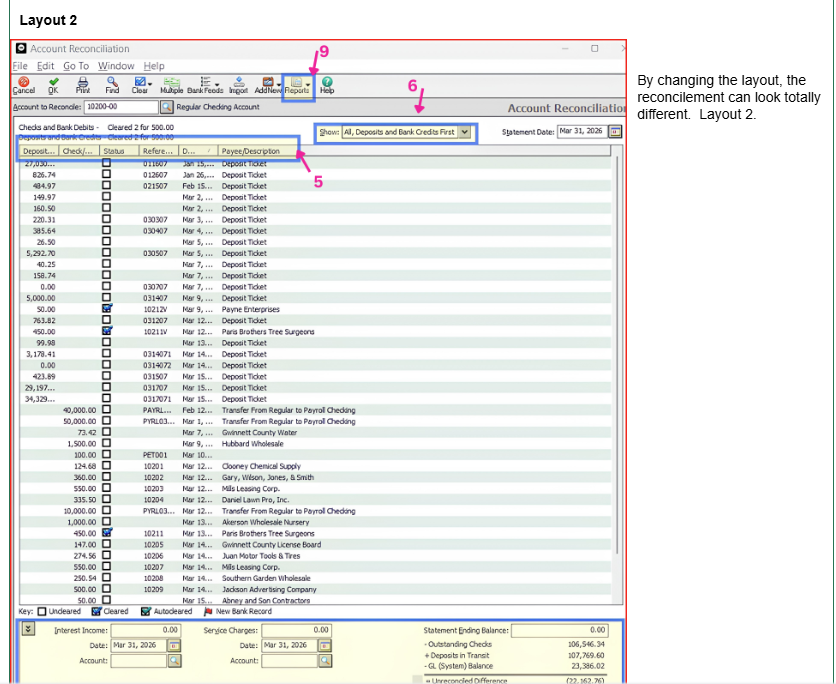
- If you want to change the view of the reconcilement page, click the down arrow at the bottom of the page.
- Also change the layout (See Layout 2) Move the columns by clicking on the title and dragging them to the best location. Make the columns smaller with your mouse.
- Focus on the area you are working in. Go to “Show” and choose the Deposits or Checks when working on balancing the statement to the Sage screen.
- Make sure you are using the correct ENDING BALANCE on the bank statement.
- Check items off until you get to Zero unreconciled difference.
- When finished reconciling, go to REPORTS Tab> Reconciliation and print your reconciled report.
Refer a Friend to Sage 50
| You already know the secret to winning the business accounting game. Why not share the answers with your friends? Refer a friend to Sage 50, and when they purchase, you’ll receive up to a $100 cash reward. |
| Your friend must be a NEW USER to Sage 50. If they purchase Sage 50 from Best Business Strategies, you will earn: $50.00 for a Pro, $75.00 for a Premium, & $100.00 for a Quantum. How Does the Referral Program Work?(When buying online)On the checkout page, your friend MUST enter your name and email. Once the order is processed, we will contact you regarding your reward. Or email us and let us know you referred a friend. When they make a purchase, we will send you a check |