BBS MONTHLY BUZZ
A monthly email newsletter from Best Business Strategies
|
|
|
|
In this issue:
●Quick Note-from Shirley
● Are You Getting The Most Out of Your Sage 50?
● September Sage 50 Tip
● Rake in the Check Savings This Fall
|
|
|
|
💻To ensure an optimal experience on our website and all attached links, we recommend utilizing either Google Chrome or Microsoft Edge as your web browser.
|
|
|
|
Sage’s fiscal year-end is next week. While we don’t know yet if there will be an upcoming price increase, now is the ideal time to add users or upgrade if you are on an older program. Securing them now is a smart way to lock in current pricing!
Please contact me, if you would like a quote. ☎️304-233-2612 📧Shirley@BestBusinessStrategies.com
|
|
|
|
Everything You Need to Know to Master Sage 50—At Any Skill Level
|
|
|
|
Ready to get the absolute most out of your Sage 50 software? Whether you prefer quick in-app guidance, self-paced Sage U courses, interactive live sessions with our BEG101 class, or physical step-by-step study guides, we’ve gathered all the top learning tools in one place. Find the support option that fits your learning style best below!
|
|
|
|
Unlock Built-In Training & Resources Directly Inside Sage 50
|
|
|
|
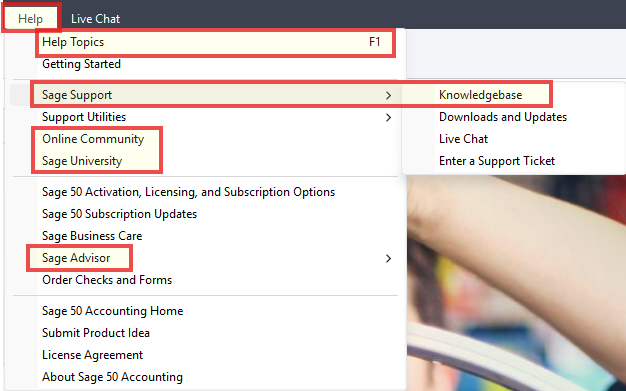
Did you know that additional resources for your Sage 50 program are available right at your fingertips?
Access these tools instantly by selecting the Help tab from the top menu bar. Training, documentation, and support are built right into the program.
I’ve highlighted the best options below—take a few minutes to explore them! If you ever get stuck, join us in the Sage Online Community. I’m active on the forums regularly and always happy to help. Hope to see you there!
|
|
|
|
|
Learn on Your Schedule: Free Sage U Video Modules
|
|
|
|
|
|
|
Did you know your Sage subscription includes an entire library of FREE core online training? Whether you’re getting team members up to speed or looking to sharpen your own workflow, these self-paced video modules are built to help you get more out of your software.
|
Why Take Advantage of Sage U classes?
⚡ Boost Efficiency & Speed: Master shortcuts and time-saving workflows.
🛡️ Minimize Errors: Learn best practices directly from Sage experts.
🎓 Free Onboarding: Train new staff without spending extra on training resources.
⏱️ Learn on Your Schedule: Bite-sized, 3–15 minute lessons you can pause, rewatch, or fast-forward anytime.
|
|
|
|
|
|
|
Whether you’re brand new to Sage 50 or have years of experience, there are classes available for all skill levels.
|
|
|
|
Each lesson is a recorded, instructor-led presentation that includes software demonstrations and guidelines for daily tasks. Lessons are 3-15 minutes long and always accessible whenever you choose. The convenient controls enable you to play, pause, fast forward, or repeat any part of the lesson. Available Languages: English
|
|
|
|
The Sage 50–U.S.–Get Started with Sage 50 Accounting course is more in‑depth than our BEG101 class and provides a comprehensive overview of Sage 50. It’s an excellent choice if you’re looking for a deeper understanding of the software.
|
|
|
|
Sage 50-U.S-Get Started with Sage 50 Accounting
Curriculum eLearning/Anytime Learning
Duration: This package consists of 47 videos, which will take approximately 2 hours and 33 minutes to complete.
New to Sage 50? This self‑guided setup package helps you start right by walking you through configuration, navigation, and beginning balances, with step‑by‑step videos for General Ledger, Banking, Accounts Payable, and Accounts Receivable.
Topics Covered:
Guided Tour Of Sage 50
- Guided Tour Navigation Centers and Help
- Guided Tour Viewing Lists
- Guided Tour AP Purchase Orders
- Guided Tour AP Purchases Receive Inventory
- Guided Tour AP Payments
- Guided Tour AP Reports
- Guided Tour Managing Inventory
- Guided Tour AR Quotes
- Guided Tour AR Sales Orders
- Guided Tour AR Sales Invoices
- Guided Tour AR Payments
- Guided Tour AR Reports
- Guided Tour General Ledger Reports
- Guided Tour Financial Statements
- Guided Tour USP Record Maintenance
- Guided Tour USP Voiding Transactions
- Guided Tour USP Account Reconciliation
- Guided Tour USP Backup and Restore
Installation
-
Installing Sage 50-Download Full Product Setup Package
- Installing Sage 50-Single Computer
- Installing Sage 50 as a Data Server
- Installing Sage 50 on a Workstation
- Installing Sage 50 using the Network Installation Manager
- Installing Sage 50-In-Product Upgrade
Introducing Sage 50
Establishing a New Company
- Creating a New Company
- Using the Setup Guide
- Backing Up Your Sage 50 Company Data
- Customizing Sage 50 with Global Options
- Creating an Admin User
-
Creating a Limited Access User
- Set up Security Options
- Setting up Webmail
- Setting Up General Ledger
- Entering General Ledger Defaults
- Maintaining the General Ledger Chart of Accounts
- Entering General Ledger Beginning Balances
Setting Up Accounts Payable
- Setting up Vendor Defaults
- Adding Vendor Records
- Vendor Management Center
Setting up Accounts Receivable
- Setting up Customer Defaults
- Setting up Customer Statement Defaults
- Creating Sales Taxes
- Adding Customers
- Customer Management Center
|
|
|
|
Other Complimentary Training Classes:
|
|
|
|
Sage 50 US – What’s New in Release 2026.1
Learn to install and update Sage 50 with guided walkthroughs.
|
|
|
Setting Up Users
Learn to create users, set security options, and manage Sage Accounts.
|
|
|
Employee Self Service
Portal
Eliminate the inconvenience of printing and emailing pay stubs with the integration with Sage HR.
|
|
|
Year-End Procedures
Learn more about year-end procedures, troubleshooting, and software upgrades and updates.
|
|
|
|
|
How to Enroll in Sage U Classes
You will need to create a Sage University profile.
To create a Sage University profile, you will need to log in to your Sage account.
Once you’ve logged on to your Sage account, complete the Sage University profile creation form. You must enter your Sage Account Number into the Account Number field to ensure that you have access to the training and benefits associated with your organization.
NOTE: Creating a Sage University profile is a one-time task. Once complete, you will simply log on to access Sage University.
If you encounter any issues with enrollment, please get in touch with us for assistance.
Shirley@BestBusinessStrategies.com 304-233-2612
|
|
|
|
Master the Basics: Join Our Free Live Sage 50 101 Class
|
|
|
|
Want a quick, hands-on guided tour of your software? Join Shirley for an interactive, live remote learning session where you’ll walk through essential Sage 50 menus, features, and shortcuts to help you work smarter every day.
🗓️ When: Held most 3rd Thursdays of the month | 3:30 PM – 4:30 PM EST
💻 Where: Online via Ooma Meeting
🎟️
Price:
- FREE if your Sage 50 software plan is/was purchased through BBS.
-
$99.99 for non-BBS software accounts, & general attendees.
🗣️ Language: English
Who should attend? Perfect for brand-new users, recent hires needing onboarding, or experienced pros looking for a quick refresher!
(Note: Registration required at least 24 hours prior to class time.)
|
|
|
|
|
Master Sage 50 with Physical Study Guides
|
|
|
|
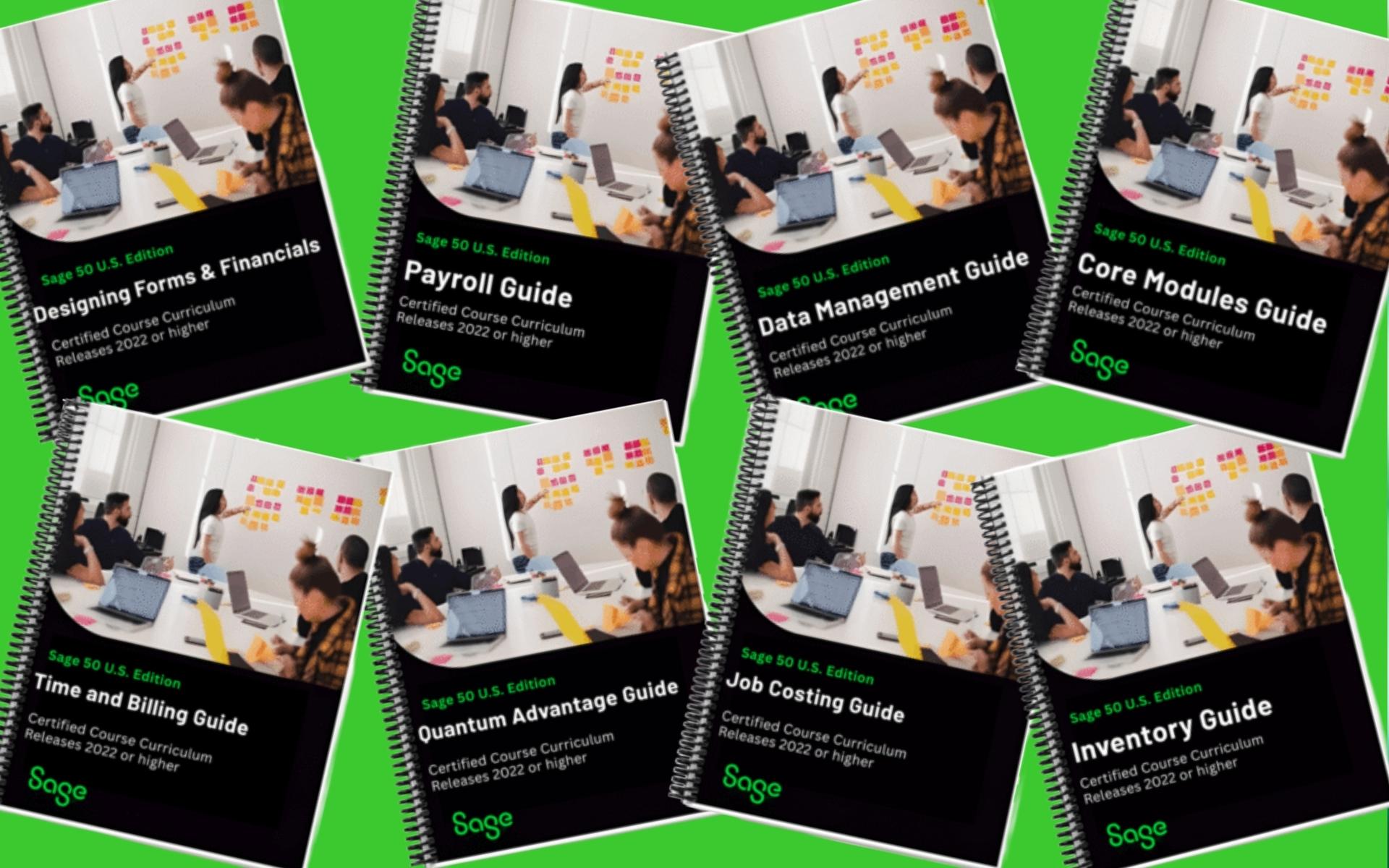
Prefer a printed, hands-on learning tool? Our Sage 50 Study Guides are designed for real-world tasks, featuring step-by-step instructions, clear screenshots, and practical examples you can apply right away.
Compatibility: Designed for Sage 50 U.S. versions 2022 and newer.
Top-Selling Guides: Designing Forms & Financials, Core Modules, Payroll, and Inventory (in stock and ready to ship).
Shipping Information (Continental U.S. Only):
Standard Shipping: $7.50 for up to 3 guides | +$2.50 per additional guide
FedEx Expedited Shipping: $45.00 flat rate
|
|
|
|
|
|
As your Sage 50 partner advocate, Best Business Strategies is committed to your success. Have a quick question? Reach out anytime—we’re happy to help!
- Quick Questions: Free and always welcome.
- Remote Support: Requires a support minutes for hands-on troubleshooting.
We hope you find the information in our monthly newsletters valuable! Stay tuned—we’re excited to announce that a dedicated Tips & Tricks section will be coming soon to our website to give you even more on-demand guidance.
Best,
|
|
|
|
September Sage 50 Tips & Tricks
|
|
|
|
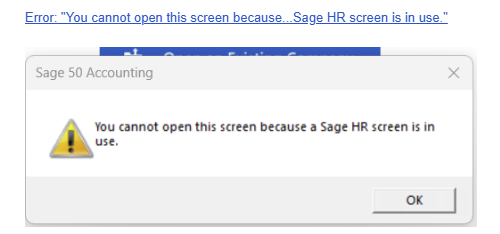
Is this message popping up on your screen?
Error: “You cannot open this screen because…Sage HR screen is in use.”
Here is the Solution:
|
|
|
|
|
Resolution:
1) Close the company, then open a sample company.
2) Close the sample company and then open the original company.
3) Now attempt to make or restore the backup.
If you need to restore and it still isn’t working, open the sample company and go to File > Restore. Select the backup file, and on the next screen select Create a new company using the restored data. Then continue restoring the backup.
If the problem continues, restart Actian on the server and workstation. See How to stop or start the Actian Zen database engine.
In the instance that the problem still continues, uninstall and reinstall Actian Zen.
|
|
|
|
🍁Rake in The Check Savings This Fall!🍂
|
|
|
|
|
|
|
Get 1000 Standard Business Checks for $200 and FREE Shipping!
|
Plus Sales tax where applicable.
Offer valid for new check orders only. Sorry, no reorders.
|
Contact A.D. to place your order:
A.D.Rutter
Check & Form Specialist
📧ADRutterBBS@gmail.com
☎️304-233-2612
Office Hours: M-W-F 9am-3pm
|
|
|
|
💡Visit our Blog for archived text-only past issues of our newsletter.
|
|
|
|
Best Business Strategies Communication Schedule
|
|
|
|
We use Act! Marketing Automation for our BBS Buzz Newsletter. If you would like to learn more, please get in touch with Allen Byard at 304-233-2612.
|
|
|
|
|







 5.0
5.0 verified by TrustindexTrustindex verifies that the company has a review score above 4.5, based on reviews collected on Google over the past 12 months, qualifying it to receive the Top Rated Certificate.