

January 2026
In this issue:
●❗Sage 50 Customer Support Scam
●Sage 50 Tips & Tricks
●Start the Year Off Smart: Back Up Your Data
●Hire Your Sales & Marketing Dream Team for $360/yr
Sage 50 Customer Support Scam
❗Unfortunately, we continue to receive customer calls reporting that they were scammed by “Sage 50 Support”. As a reminder, please DO NOT Google the Sage Support phone number. There are fraudulent Sage Support numbers online. Please spread the word to any of your coworkers.
We’re always here for you at Best Business Strategies! Just give us a call, and we’ll happily share Sage’s Technical Support number with you: 866-747-3888.
Sage 50 Tips & Tricks
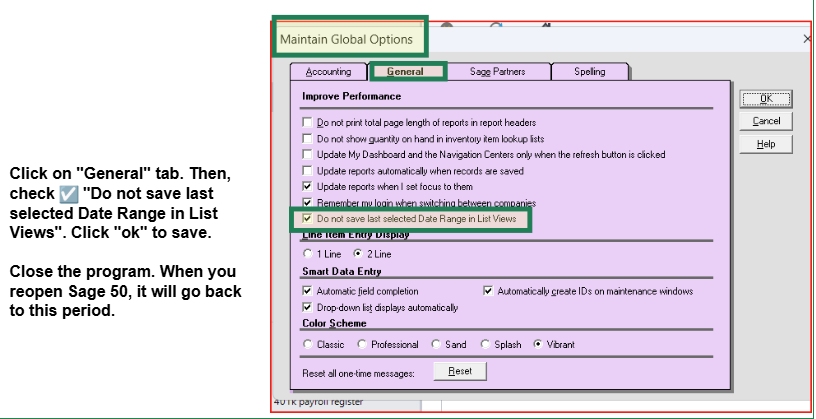
Problem: When you accidentally click “view and edit sales invoices” and select “all transactions,” it takes a very long time to load.
Solution: Go to “options” on top menu bar.
Sage 50 Tip: Best Way To Install Sage 50 & Backup
The normal data path is Sage > Peachtree > Company. The program must be on the C Drive, but the data can be stored on a different internal drive.
In the Company folder, you will find all of the Sage Data folders for each company you have created.
In Updates, you will find all of the updates you have downloaded for the program.
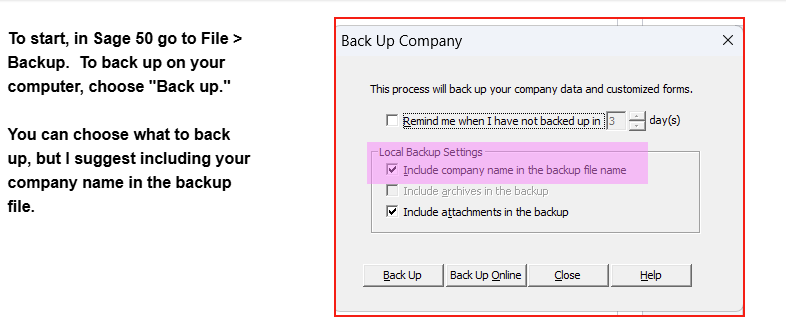
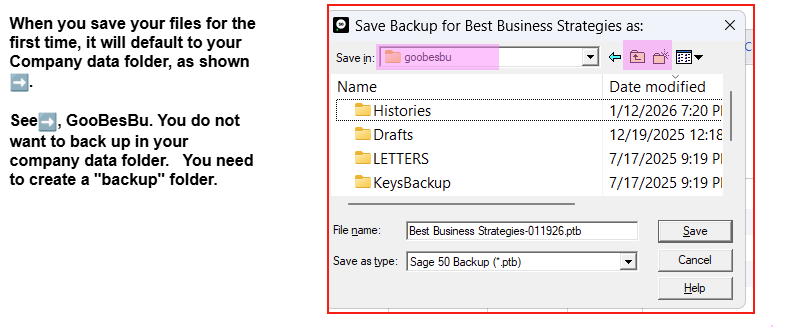
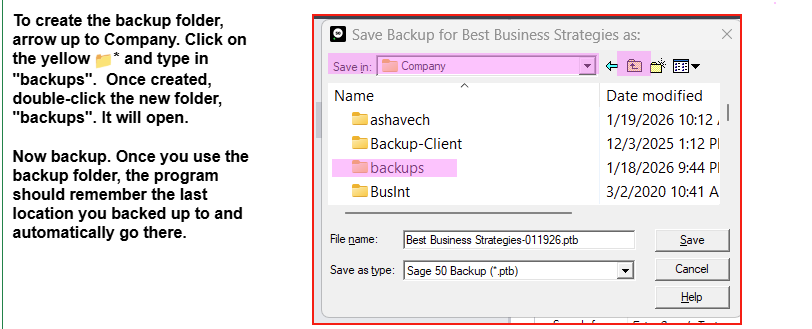
I also want to share the process to backup your company’s data files. When you backup your data in your very own company folder, it keeps growing. We don’t want to backup there! Let me show you the best way to back up your data on your computer.
Start the Year Off Smart: Back Up Your Data with Enveloc Remote Backup
It’s important to back up more than just your Sage data—your entire network matters too. We offer an easy solution that takes the hassle out of backups.
A new year is the perfect time to set smarter habits—especially when it comes to protecting your business data. While many organizations focus on fresh goals and growth strategies in January, one critical area is often overlooked: data backup and recovery.
One of the biggest misconceptions among businesses is that data loss only happens to others. In reality, most data loss incidents impact small and mid‑sized organizations, often because they lack proper backup solutions.
A single incident can result in:
Lost revenue
Damaged customer trust
Regulatory or compliance concerns
Extended downtime
Implementing Enveloc Remote Backup at the start of the year helps ensure you’re not caught unprepared.
What Is Enveloc Remote Backup?
Enveloc Remote Backup is a secure, automated solution that protects your critical business data by backing it up off-site. Instead of relying on manual processes or vulnerable local storage, Enveloc works quietly in the background to ensure your data is always protected and recoverable. It’s a “set it and forget it” approach—simple, reliable, and effective.
Your Sales & Marketing Dream Team in a Box
Act! Advantage Business Suite Brings It All Together
If your sales and marketing tools feel a little out of sync, you’re not alone. Many growing businesses juggle multiple platforms and still struggle to keep things moving.
One Central Hub for Every Relationship
At the heart of Act! Advantage is a robust CRM that keeps all your customer and prospect information in one place. Contacts, interactions, history, notes, opportunities, and activities are all connected—so your team always knows who they’re talking to, why it matters, and what comes next.
Built-In Marketing That Actually Supports SalesMarketing Automation
Online Surveys
Online Appointment Scheduling
Online Event Management
Interactive Quotes
Project Management
Email List Verification
Online Lead Forms
Website Chats
Mobile
& More
It’s not just software.
It’s your sales & marketing dream team in a box.
Pricing Starts at $30/mo Want to Learn More?
Schedule a Demo
Contact: Allen Byard Act! Certified Consultant 304-233-2612
Allen@BestBusinessStrategies.com