


In this issue:
●Introducing the New Sage Expense Automation Add‑On
●February Sage 50 Tips & Tricks
●How Act! Advantage Can Save You Money
Sage Expense Management Automation
| Supercharge Your Sage Experience with Automated Expense Management |
If your team is still chasing receipts, re‑keying data, or spending too much time reconciling expenses in Sage, it’s time for an upgrade. Our Sage‑integrated expense management solution—formerly Fyle—helps businesses reclaim hours every month while improving accuracy, compliance, and visibility. |
Sage Automated Expenses will:  Eliminate manual data entry Eliminate manual data entryEmployees simply snap a photo or forward a receipt via email. Fyle extracts the details instantly—no typing, no delays. Cut approval times in halfReal‑time policy checks flag issues before submission, reducing back‑and‑forth and keeping teams moving. Sync directly with Sage—no more messy spreadsheetsApproved expenses flow directly into Sage, with the correct categories, GL codes, projects, and tax details already mapped. Control spend before it becomes a problemGain real‑time visibility into budgets, trends, and policy violations so you can make faster, better financial decisions. Empower employees and finance teams alikeA simple, intuitive experience that saves time for everyone—from field staff to the CFO. The result? Faster month‑end close, fewer errors, better compliance, and happier teams. |
| Discover how easily you can cut hours of admin work—watch the quick overview video. Ready to see it in action for your own team? Schedule a personalized demo today.Schedule a Demo Pricing Information |
Sage 50 Tips & Tricks
| Problem: Your custom Global Options settings were reset to default setting when Sage 50 2026 was installed. |
Solution: After installing a new Sage 50 program, go to the Top Menu bar, choose “Options”>”Global”, and adjust the settings to your liking. These are the settings I currently use, but you can choose your own.  These adjustments must be made on each machine. They are not set per user. These adjustments must be made on each machine. They are not set per user. |
Maximize Your Potential, Minimize Your Cost
How many of these apps do you currently use?
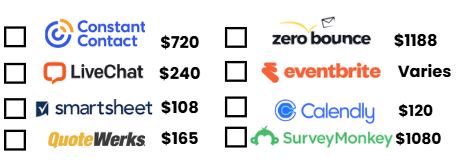
| Depending on your answer, Act! Advantage can save you money! |
| Act! Advantage not only includes the #1 best-selling CRM solution, but also includes a suite of powerful tools: |
| Interactive Quotes Online Surveys, Online Event Management Online Customer Portal, Online Appointment Scheduling Project Management Online Forms Email Verification Website Chat |
| One Password, One Login, a CRM plus Powerful ToolsALL FOR ONE LOW PRICE-Annual plans start at $360.00! |
| Want to see how much Act! Advantage could save your business this year? |
| Schedule a DemoContact Allen Byard, Act! Certified Consultant304-233-2612 Allen@BestBusinessStrategies. |